
Exceptional customer service and support have become a crucial differentiator for businesses, setting ahead of the curve and nurturing positive, lasting relationships with their customers. However, managing a high volume of inquiries and providing consistent, personalised service for each ticket can be challenging.
With support desk software, centralising and optimising customer interactions has become easier than ever, empowering businesses to maintain customer loyalty and drive business growth. In this guide, we explore the fundamentals of this software, its key features, implementation strategies, and the benefits it can bring to businesses.
To fully appreciate its value, it's essential to understand the software’s core functionalities and how it transforms support operations. This section explores everything you need to know about customer support desk software.

Top-notch customer service has become non-negotiable, likely due to the evolution of customer behaviour and expectations. In this digital age, customers have become more informed, resulting in higher standards for the speed and quality of support they receive. In fact, 96% of consumers emphasise the importance of customer service when dedicating their loyalty to a brand. As such, immediate responses, personalised interactions, and seamless omnichannel experiences are pivotal to an enhanced customer experience.
Customer support desk software, often referred to as help desk software, is a digital solution that enables businesses to manage these queries, issues, and requests efficiently. It acts as a centralised platform that streamlines and automates operations, facilitates seamless communication through various channels, and more, to help businesses meet today’s heightened customer demands.
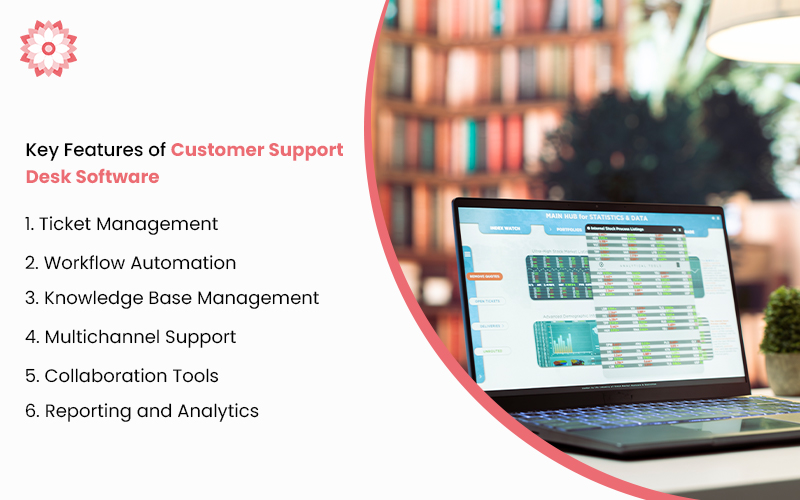
Customer support desk software comes with ticket management capabilities to create, track, and manage support tickets, enabling agents and teams to handle inquiries efficiently. Every unique customer issue or request will be passed over to the appropriate agent for resolution, ensuring no query goes unresolved.
Additionally, the software may come with advanced features such as intelligent routing, which automatically directs tickets to the most suitable agents based on their expertise, availability, and workload. Similarly, prioritisation mechanisms rank tickets by urgency, allowing critical issues to be handled swiftly while less pressing matters are queued accordingly.
Workflow automation is an essential feature of modern customer software solutions. For example, repetitive tasks, escalation based on priority, and timely follow-ups can be automated to streamline operations. Additionally, pre-defined templates can be used to respond to common customer inquiries, alleviating the workload for support agents and allowing them to focus on other complex issues that require human intervention.
Customer support desk software also includes an integrated knowledge base that houses a wealth of information, including articles, FAQs, troubleshooting guides, product documentation, and more. This empowers both customers and support agents with accurate, up-to-date information, helping them find solutions to common issues independently.

Many customer software solutions support a diverse range of communication channels, including email, live chat, phone support, and even integration with social media platforms. The software then funnels all inquiries from various platforms into a unified inbox which enables support agents to manage customer interactions from a single platform.
Additionally, customer support desk software is home to features that facilitate collaboration within your organisation. For example, internal team messaging enables real-time discussions among support agents, allowing them to quickly seek advice, share insights, and coordinate on complex issues without leaving the support platform. Capabilities such as shared ticket views and collaborative ticket management tools also enable multiple agents to work together on resolving customer issues efficiently and transparently.
Lastly, robust reporting and analytics features provide valuable insights into support operations and customer interactions. Businesses can track key metrics such as ticket volumes, response times, and agent performance metrics—data that allows them to identify areas for improvement and optimise resource allocation. These insights enable management to implement strategic initiatives, enhancing service quality over time.
Having explored the fundamentals of customer support desk software, the next step is understanding the implementation process. Whether you're upgrading your current system or adopting a new solution, this section breaks down essential tips to help you leverage technology for superior customer support.
First, selecting the right software requires several key considerations.
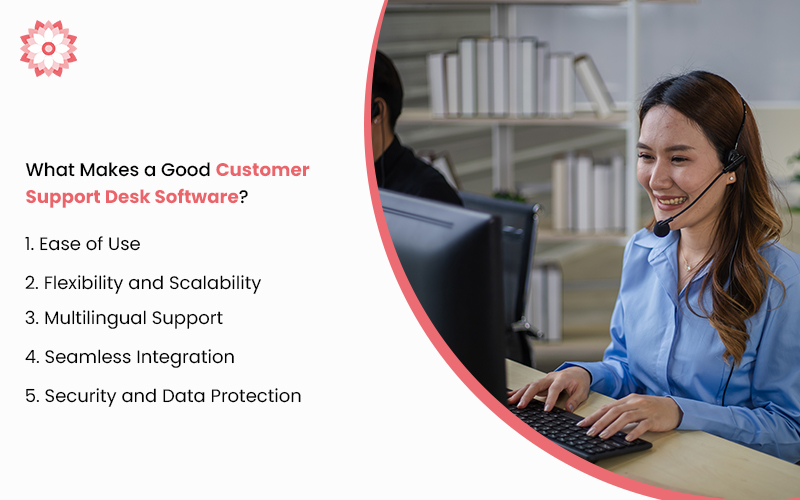
It’s important to choose a customer support desk software with an intuitive and user-friendly interface. On one hand, agents will be able to quickly learn and utilise the software, reducing the time needed for training and onboarding. On the other hand, customers can easily access support features, submit tickets, and find self-help resources without frustration. Opting for a platform with a well-designed interface not only enhances usability but also contributes to overall efficiency, fostering smoother interactions for both agents and customers alike.
As businesses grow and their needs evolve, software solutions need to accommodate increasing customer volumes and expanding support team sizes without compromising performance. Easy customisation is essential, as it allows the platform to adapt to your changing business requirements, such as adding new support channels or creating custom workflows.
In today's global business environment, platforms offering multilingual capabilities are essential for cultivating collaboration among remote teams. A centralised platform that supports multiple languages enables team members and support agents from different regions to communicate seamlessly, keeping everyone on the same page regardless of their native language. This feature not only drives internal team collaboration but also helps agents provide consistent, high-quality support to customers worldwide.
Opt for a customer support desk software with robust integration capabilities. This means it should seamlessly connect with your CRM software, marketing automation platforms, e-commerce systems, and other essential business applications. This enables quick access to comprehensive customer information within a single interface, allowing support agents to deliver prompt and informed responses without switching between multiple platforms.
Vigorous security measures are essential to safeguard sensitive information from unauthorised access, breaches, and cyber threats. As such, choose customer software solutions that use data encryption, which securely transmits and stores data, and implement access controls that restrict access to authorised personnel only. These comprehensive security measures help retain customer trust, assuring them that their data is handled with the utmost care and integrity.
With effective customer support desk software at hand, your business enjoys a host of benefits, including:
Implementing customer support desk software leads to a higher return on investment (ROI). Automated workflows operate alongside efficient ticket management, reducing the time and resources needed to resolve customer issues. Additionally, support teams will be able to handle more inquiries without the need for additional staff. This translates to greater cost savings and frees up resources that can be redirected towards other initiatives, driving revenue growth and profitability.
Ticket management solutions empower agents to respond to customer inquiries promptly. Given that 82% of consumers expect responses within 10 minutes, quick response times are critical for delivering a better customer experience. This reassures customers that their concerns are being addressed urgently and attentively, reinforcing their confidence and trust in the business.
Alongside rapid response times, businesses can also deliver consistent and personalised support experiences tailored to customers’ specific needs and preferences. For instance, customer support desk software that integrates with CRM systems provides agents with comprehensive profiles, allowing them to offer targeted solutions and maintain consistency across all touchpoints.
Personalised support goes a long way in promoting a better customer experience. By making interactions feel more relevant and thoughtful, businesses can significantly boost their customer retention and loyalty, driving growth in the long run.
Automated processes not only increase profitability and improve the customer experience but also serve to alleviate support agent workload. This boosts productivity and reduces stress levels, leading to higher job satisfaction and enhanced well-being among agents. Agents will be more likely to stay at their jobs, addressing the high turnover rates prevalent in inbound customer service centres.
Furthermore, ticket management software integrates with HR processes to map business hours and holidays, promoting a healthier work-life balance that further contributes to long-term job satisfaction.
However, to truly reap the benefits listed above, effective implementation is key. Here are some essential tips and best practices to help you achieve optimal performance.
First, tailor the support desk software to align with your organisation's specific business processes and customer service standards. Customise your ticket forms to capture information relevant to your offerings and business and refine your service level agreement (SLA) rules. This helps to set clear customer expectations for response and resolution based on your business and software capabilities.
Next, define clear workflows from ticket creation to resolution. Begin by specifying criteria for ticket assignment based on agent skills, issue urgency, or departmental responsibilities for efficient allocation. Then, facilitate issue management by redefining escalation paths and establishing clear guidelines on when and how to escalate. Finally, document resolution processes to provide a blueprint for future cases, maintaining consistency in resolving customer concerns.
Maintaining an up-to-date and comprehensive knowledge base is key to empowering both customers and support agents. You can do so by continuously adding new articles, updating FAQs, and refining troubleshooting guides to address common issues and promote self-service. Moreover, an updated knowledge base demonstrates your business’s attention to detail, further enhancing overall customer and employee satisfaction.

Ensure proficiency among all relevant staff by organising comprehensive training and onboarding programmes. These sessions cover software navigation, ticket management, communication tools, and reporting features.
Don’t forget to supplement software training by educating employees on essential best practices for customer interaction. Make sure to emphasise the importance of empathy when communicating with customers and develop their problem-solving skills for better issue resolution. This equips your support agents with the necessary tools and knowledge needed to deliver superior service and contribute positively to the overall customer experience.
Finally, encourage a culture of continuous improvement and innovation by regularly reviewing and refining processes. Consider setting up a feedback loop to gather insights and ideas for enhancing operational efficiency and customer satisfaction. It is also crucial to stay informed about updates, new features, and best practices offered by the software provider and leverage technological advancements for further streamlining.
Embracing continuous improvement and staying abreast of industry trends will equip your business with greater adaptability to evolving customer needs.
With the key information and best practices outlined in this guide, businesses can leverage customer support desk software as a strategic asset to foster stronger customer relationships and maintain a competitive edge in the market.
At Dahlia Technologies, we understand the importance of providing superior customer support. Our advanced IT solutions are tailored to meet your unique business needs, ensuring efficient operations and enhanced customer satisfaction.
So, unlock operational efficiency for your business today with My Ticket Solutions (MTS), our top-rated customer support desk software. From seamless ticket management to real-time communication tools and multilingual capabilities, MTS is your gateway to smoother workflows and happier customers.
Contact us today to learn more.